
The Settings tab is where you tune Liverly to fit you — from language and units to your liver profile and account. This page walks through each section in order.
Preferences
- Notifications — turn reminders on or off and choose which ones you get (meal reminders, streak reminders, milestone celebrations). Full details in Notifications.
- Theme — choose Auto (follow your phone’s system setting), Light, or Dark.
- Language — pick any of 13 languages: English, Spanish, French, German, Portuguese, Arabic, Italian, Japanese, Korean, Dutch, Polish, Turkish, or Chinese (Traditional). Switching to or from Arabic requires an app restart to flip the layout direction.
- Volume Unit — Milliliters (ml) or Fluid Ounces (oz) for hydration tracking.
- Weight Unit — Kilograms (kg) or Pounds (lbs) for body weight.
Profile
This section holds the medical details that personalize the entire app.
Liver Condition
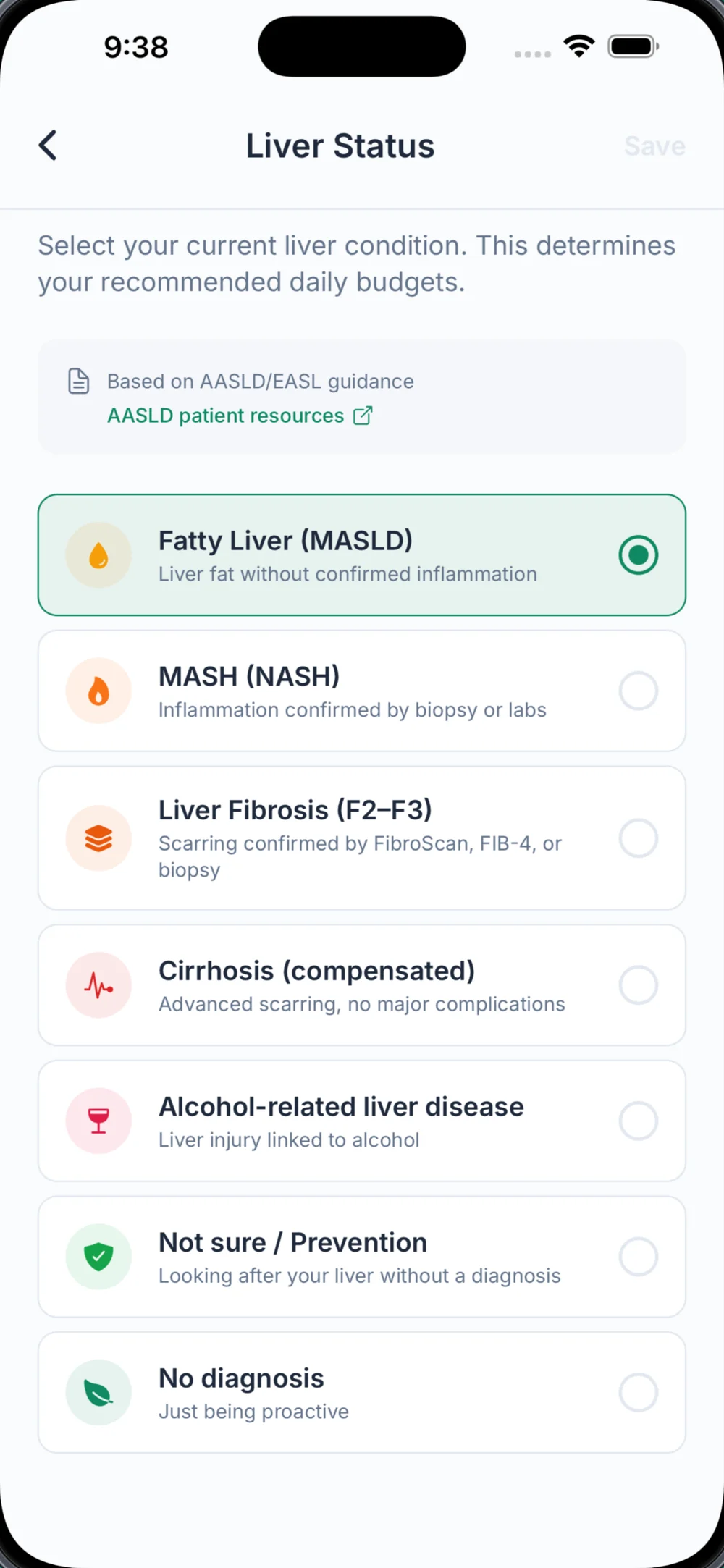
Tap Liver Condition to change your diagnosis. Options are:
| Option | Description shown in the app |
|---|---|
| Fatty Liver (MASLD/NAFLD) | Fat in the liver without confirmed inflammation — includes ultrasound “grade 1–3” |
| MASH (NASH) | Inflammation confirmed by biopsy or labs |
| Liver Fibrosis (F2–F3) | Known scarring from FibroScan, FIB-4, or biopsy |
| Cirrhosis (compensated) | Advanced scarring without current complications |
| Cirrhosis (decompensated) | Set via a follow-up question about complications (ascites, encephalopathy, varices) |
| Alcohol-related liver disease | Liver disease where alcohol is a main driver |
| Not Sure / Prevention | No diagnosis, exploring or taking preventive measures |
Saving a new condition immediately recalculates your daily nutrient budgets (informed by AASLD and EASL-EASD-EASO guidance — there’s a View Guidelines link on the screen).
Tip: Changing your condition resets any custom limits back to auto-calculated values. If your doctor gave you specific numbers, re-enter them under Custom Limits afterward.
FIB-4 Calculator
Not sure where you stand? The FIB-4 Calculator estimates your fibrosis risk from a recent blood test. Enter:
- AST and ALT — straight from your lab report
- Platelet count
- Age
You’ll see your FIB-4 score and the risk band it falls into: below 1.3 suggests low risk, 1.3–2.67 is indeterminate, and above 2.67 suggests higher risk of advanced fibrosis (with an adjusted cutoff if you’re 65 or older, and a note that FIB-4 is unreliable under age 35). If the result suggests a different picture than your current Liverly condition, the app suggests discussing it with your doctor — it never changes your condition for you.
The calculator’s own words apply here: this is an educational estimate, not a medical diagnosis. Always discuss your results with your doctor.
Health Conditions
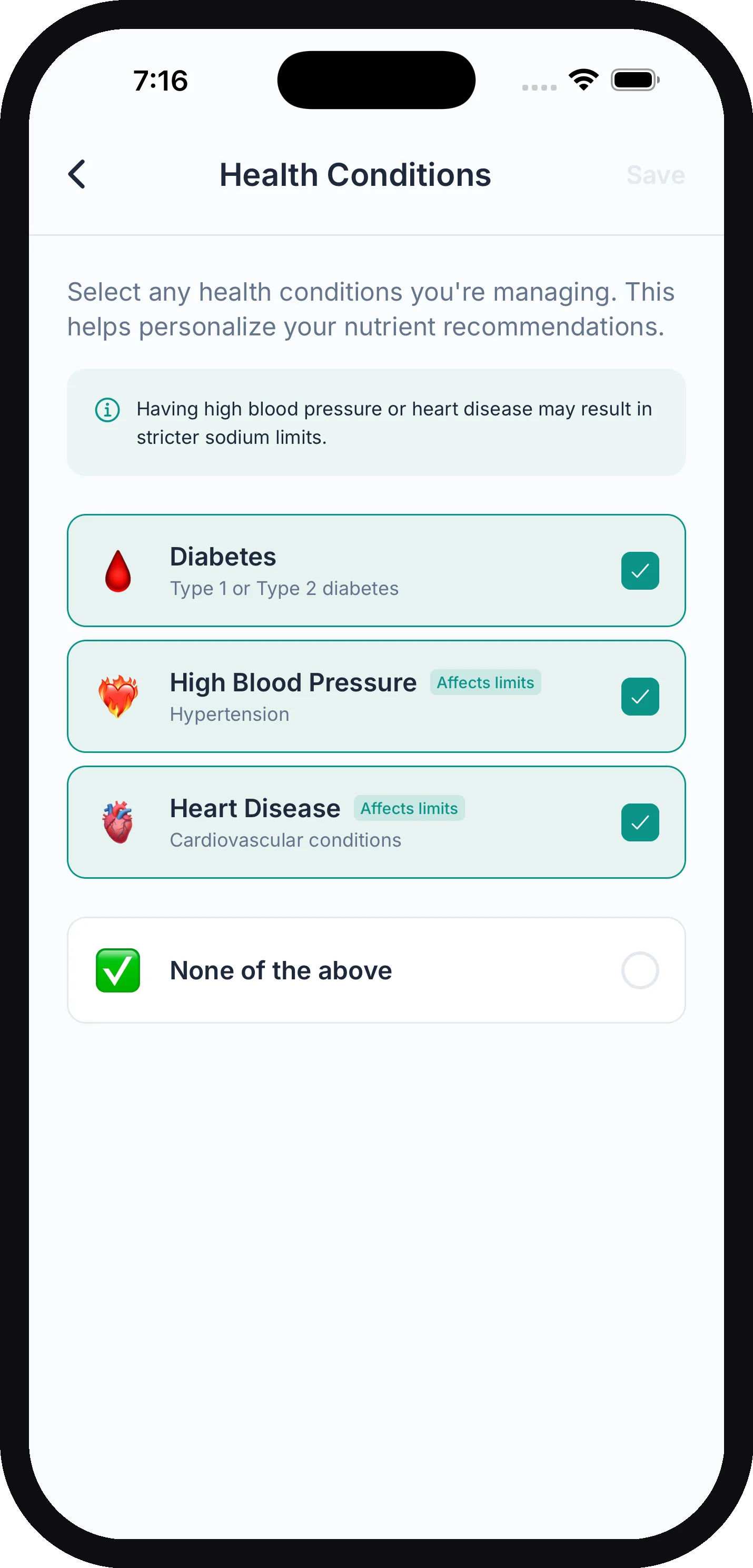
Select any conditions you’re managing:
- Type 2 Diabetes — tightens your added-sugar budget
- High Cholesterol — tightens your saturated-fat budget
- High Blood Pressure (hypertension) — tightens your sodium budget
- Heart Disease — tightens sodium and saturated fat
- Obesity — turns the weight-loss calorie deficit on
- Hypothyroidism — taken into account in meal analysis and chat answers; no budget change
Choose None of the above if none apply. See How Your Budgets Are Calculated for the details.
Optional Nutrients (requires Liverly Pro)
Add carbs & sugars, total fat, cholesterol, protein, and sodium to your daily dashboard, each with an optional limit. Covered fully in How Your Budgets Are Calculated.
Apple Health (iOS only)
On iPhone you’ll see an Apple Health section with the Apple Health Sync toggle — it syncs weight, hydration, and nutrition with the Health app. Advanced sync requires Liverly Pro. Full setup in Apple Health.
Custom Limits
The Custom Limits section lets you override Liverly’s calculated values with numbers from your doctor. Each nutrient — Added Sugar, Saturated Fat, Calories, Fiber, Sodium, and Protein — shows its current daily value tagged auto or custom. Tap one to enter a custom value or reset it. The protein editor also lets you update your body weight, since protein targets and calorie budgets are calculated from it.
For how this all fits together, see How Your Budgets Are Calculated.
Diet Preferences
Liverly also has a Diet Preferences screen — Vegetarian, Vegan, Gluten-Free, and Dairy-Free — reached from the filters on the Recipes tab rather than from Settings. These filter recipe suggestions only; they don’t change your nutrient budgets. See Recipes.
Account
- Manage Subscription — opens subscription management for your plan. Details in Subscription & Billing.
- Restore Purchases — re-activates Liverly Pro if you’ve reinstalled the app or switched phones.
- Rate Liverly — opens the App Store or Play Store review page. Honest reviews help other people managing their liver find the app.
- Feedback / Support — opens an email to support@liverly.app with your app version pre-filled so we can help faster.
- Sign Out — signs you out without deleting anything; your data is waiting when you sign back in.
- Delete Account — permanently deletes your account and all data. This cannot be undone. See Account & Privacy before you tap it.
Legal
Links to Liverly’s Privacy Policy and Terms of Service, both hosted at liverly.app.