
Hydration in Liverly works the opposite way from most of the app’s budgets: it’s a goal to reach, not a limit to stay under. And in one of the app’s happier surprises, coffee gets tracked as a positive too.
Why Hydration Is a Goal
Staying well hydrated supports your overall health while you work on your liver — especially if you’re eating more fiber, exercising more, or losing weight. Liverly gives you a daily water goal (2,000ml by default) and fills it in as you drink through the day.
One important exception: if you have decompensated cirrhosis, your care team may give you specific fluid guidance. Follow their instructions — Liverly’s hydration goal is general wellness, not a prescription.
And remember: “fluid” isn’t just what’s in your glass. Soup, coffee, juice, and milk all count.
Coffee Is Actually Good News
Yes, really: regular coffee consumption is associated with better liver outcomes in the research behind major liver guidelines, and 2–3 cups a day is a reasonable goal for most people. That’s why Liverly tracks coffee positively instead of scolding you for it.
Two caveats the app will also remind you about: the benefit is for coffee, not the sugar and cream — a caramel blended drink is a dessert — and if coffee doesn’t agree with you, there’s no need to start.
The Hydration Tracker
The Fluid Intake card sits right below your nutrient dashboard. A circular wave animation fills up as you drink through the day, with your percentage in the middle and your running total next to your daily goal (for example, 750ml / 2,000ml).
A status badge below shows how much is left to reach your goal — and when you hit it, the tracker celebrates instead of turning red.
Everything you’ve logged today appears as a row of pills under the tracker, so you can see your drinks — including your coffee count — at a glance.
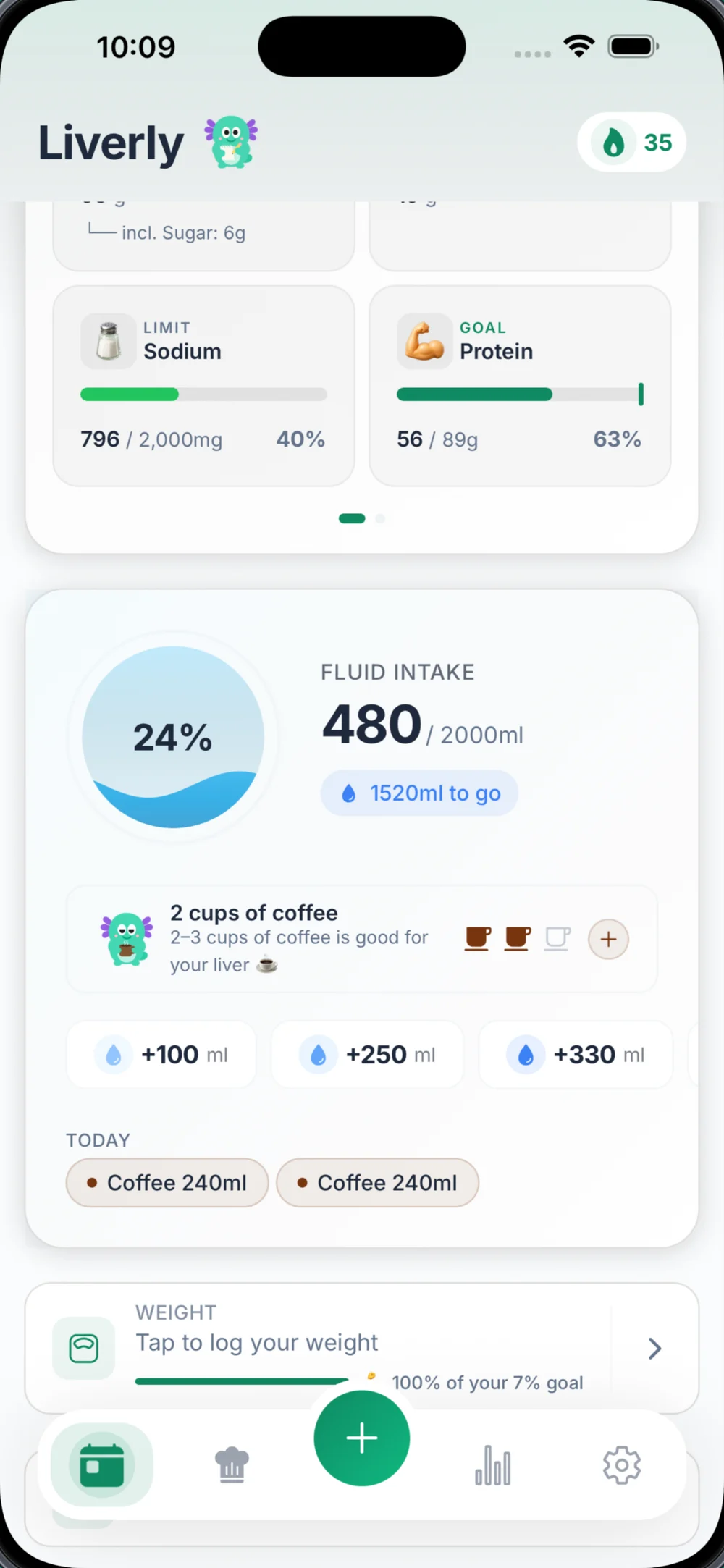
Logging Water
Water is the fastest thing to log in the whole app:
- Quick Add buttons log a glass in one tap — 100, 250, or 500 ml (or 4, 8, and 16 oz if you prefer ounces).
- Custom opens the Add Water sheet, where you can pick a quick amount or type in any amount.
Tip: Logged too much by accident? Tap the water pill under the tracker and confirm Remove Fluid.
Logging Coffee, Juice, Milk, and Other Drinks
For drinks that contain nutrients, use Quick Log (Add Food → Say or Type) or scan it instead of the water buttons. Liverly estimates both the fluid amount and the nutrients, so everything is counted correctly.
Liverly recognizes these fluid types: Water, Coffee, Tea, Juice, Milk, Soda, Soup, and Other.
This matters because drinks aren’t just fluid:
- A glass of juice or a soda can carry a whole day’s added-sugar budget — sugary drinks are the single biggest thing to swap out for your liver
- A latte with syrup adds added sugar and saturated fat; black or lightly-splashed coffee doesn’t
- A glass of milk adds calories, saturated fat, and protein
When you log a drink this way, it counts toward your hydration goal and its nutrients count toward your nutrient budgets — and it shows up in both the fluid tracker and your meal timeline. No double-entry needed.
Your Daily Hydration Goal
Liverly starts everyone at a 2,000ml daily goal. There’s no per-condition fluid restriction — hydration is treated as a positive habit, not something to ration.
If your care team gave you a different number (for example, fluid guidance with decompensated cirrhosis), set it yourself: go to Settings → Custom Limits and enter it. Custom values always override the default. Learn more in Nutrient Budgets and Settings.
Milliliters or Fluid Ounces
Liverly works in whichever unit you think in. Go to Settings → Volume Unit and choose Milliliters (ml) or Fluid Ounces (oz). The tracker, quick-add buttons, and all amounts switch over instantly.
Apple Health
On iOS, Liverly Pro can sync water both ways with Apple Health — water you log in Liverly appears in the Health app, and water from other apps appears in your hydration tracker with a small heart icon.
One thing to know: water imported from Apple Health can’t be deleted inside Liverly. Delete it in the Health app instead, and it disappears from Liverly on the next sync. See Apple Health for setup.